SpriteSkin

AI Minecraft Skin Generator

Turn a photo or a text prompt into a playable Minecraft skin in about 2 minutes: a 64×64 PNG for Java and an HD 128×128 .mcpack for Bedrock. Sign in with Google and get 3 free skins.

  • No app · no download
  • 64×64 · classic & slim
  • 3 free credits
Crafting table1 credit per skin
Drop a photo hereJPG, PNG or WEBP · up to 10 MB · one face, looking forward

Photos are deleted within 24 hours. Must be 13+.
Arm style
Add a photo to start — or switch to From Text.
PreviewJava & Bedrock ready
Auto-rotate
Example: “Cyberpunk ninja” · drag to rotate
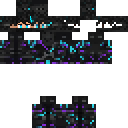
Example · 128×128

How to make a Minecraft skin with AI

  1. 1

    Add a photo or a prompt

    Drop in a selfie, or describe the character you want in a sentence. Pick classic or slim arms.

  2. 2

    Generate in about 2 minutes

    The AI maps your look onto a 64×64 skin and an HD 128×128 version. Spin the 3D preview and try a walk cycle; the skin is saved in My skins.

  3. 3

    Download and play

    Get a 64×64 PNG for Java Edition or an HD 128×128 .mcpack for Bedrock. Fine-tune any pixel in the free editor first.

How to install a skin

What is an AI Minecraft Skin Generator?

An AI Minecraft Skin Generator turns a photo or a short description into a Minecraft skin: the texture that wraps your character in game. SpriteSkin reads the face, hair, clothes and colors, draws the face separately for likeness, and paints everything onto the standard skin layout, so the file works in Java and Bedrock.

Every skin comes in two files: a 64×64 PNG for Java Edition and an HD 128×128 .mcpack skin pack for Bedrock. You get a 3D preview before you download, and every pixel can still be edited by hand in the free Skin Designer.

People also call this an AI Minecraft skin maker, a Minecraft skin creator AI or a Minecraft AI skin generator. Whatever the name, the job is the same: a photo or a prompt goes in, and a skin you can load in game comes out. Each skin costs 1 credit, failed skins are refunded automatically, and you get 3 free credits when you sign in.

64×64 vs 128×128 skin sizes

Unedited results from the photo to Minecraft skin and text to Minecraft skin modes, shown at 128×128 (HD). The sample photos are AI-generated people, not real people.
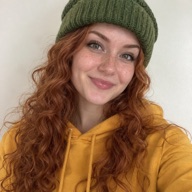

Sample photo (AI-generated person)
Maya: red curls, green beanie, yellow hoodie
From photoMaya: red curls, green beanie, yellow hoodie
Sample photo (AI-generated person)
Leo: round glasses, denim jacket
From photoLeo: round glasses, denim jacket
Text prompt
“Knight in emerald armor”
From text“Knight in emerald armor”
Text prompt
“Space explorer with a jetpack”
From text“Space explorer with a jetpack”
Text prompt
“Cozy frog hoodie”
From text“Cozy frog hoodie”
Text prompt
“Cyberpunk ninja”
From text“Cyberpunk ninja”

More free tools

No login, no credits. Open one and start placing pixels.

Minecraft Cape Maker64×32 pixel editor with a live 3D cape and elytra.Free · no login →Skin DesignerDraw a 64×64 skin by hand with a live 3D preview.Free · no login →Bedrock Skin EditorMake 64×64 or HD 128×128 skins and export a .mcpack.Free · no login →
Skin Pack CreatorBundle several skins into one Bedrock .mcpack.Coming soon
Pixel Art GeneratorTurn any image into block-friendly pixel art.Coming soon
Banner MakerLayer patterns and colors, preview, then export.Coming soon

Credit packs

AI skins cost 1 credit each. Editors are always free. Sign in and get 3 credits to try it.

+3 free credits on sign-up
Starter$9.99one-time
  • 12 AI skin credits
  • Photo and text modes
  • PNG + .mcpack downloads
Best valueCreator$24.99one-time
  • 35 AI skin credits
  • Photo and text modes
  • PNG + .mcpack downloads
Studio$49.99one-time
  • 80 AI skin credits
  • Photo and text modes
  • PNG + .mcpack downloads

Prices in USD. Taxes are calculated at checkout by our payment partner.

AI Minecraft Skin Generator FAQ

Is SpriteSkin free?

Partly. The Skin Designer, the Bedrock Skin Editor and the Cape Maker are free with no login. AI skins cost 1 credit each; you get 3 free credits when you sign in with Google, and packs start at 12 skins for $9.99. There is no subscription.

Can it turn a photo of me into a Minecraft skin?

Yes. Upload one clear photo with one face looking toward the camera, pick Classic or Slim arms, and the skin is ready in about 2 minutes. You must be 13 or older to upload a photo.

Does the skin work on both Java and Bedrock?

Yes. Every AI skin comes as a 64×64 PNG for Java Edition and an HD 128×128 .mcpack for Bedrock on phones, tablets and Windows. Both use the standard skin layout with two layers.

Is an AI Minecraft skin generator worth it, or should I use a free editor?

Use the AI when you want a skin that looks like you or your idea in minutes; use a free editor when you enjoy placing every pixel. Here you can do both: generate a first version, then press Edit in editor to fix any pixel in the free Skin Designer.

How is SpriteSkin different from cheaper AI skin generators?

It is built for likeness and finished files. The AI draws your face separately and maps it onto the skin layout, every skin comes as a Java PNG and an HD Bedrock .mcpack, and a skin that fails is refunded automatically.

How do I install a skin on Java Edition?

Download the PNG. Open the Minecraft Launcher, go to Skins, choose New skin, upload the file and pick Classic or Slim arms. It shows up the next time you join a world or server. Step-by-step install guide

How do I install a skin on Bedrock Edition?

Download the .mcpack and open it. Minecraft starts and imports the pack. Then go to Dressing Room, open the pack and equip the skin. On consoles, import the PNG through Classic Skins → Owned → Import where your device supports it.

What is the difference between 64×64 and 128×128 skins?

A 128×128 skin has twice the resolution, so faces and patterns get finer. Java Edition only loads 64×64 skins without mods, while Bedrock skin packs accept 128×128 HD skins, so you get a 64×64 PNG for Java and an HD .mcpack for Bedrock. 64×64 vs 128×128 explained

Classic or slim arms — which should I pick?

Pick the one you will select in game. Classic arms are 4 pixels wide and slim arms are 3, so a mismatch makes the sleeves look shifted.

Is my photo private?

Yes. Uploads are private, never shown in a gallery and deleted automatically within 24 hours of upload. Your finished skins stay in My skins until you delete them.

Why didn’t my photo work?

Usually the photo had no clear face. The AI needs one face looking toward the camera; group photos, heavy filters or very dark images can fail. If a skin fails, the credit is refunded automatically.

Can I edit the skin after it is generated?

Yes. Press Edit in editor to open it in the free Skin Designer, change any pixel, then download the PNG or .mcpack again.

Will other players see my skin on servers?

Yes, on most servers. On Java servers other players see the skin set on your account; on Bedrock your equipped skin shows on servers that allow custom skins.

Your next skin is one photo away

Upload, generate, download. Then show it off in game.